




You can get paid faster by allowing your clients to pay invoices by credit card or PayPal. All you need is to enable the Payment Link. How? Piece of cake!
How do I use Payment Link?
1. On the Invoice Detail screen click the "Payments" tab:
2. Click the "Start Accepting Cards" button:
3. Select a Gateway (PayPal example shown below):
4. Fill in your PayPal Email:
Fill in your PayPal Email and click the "Save" button. Unless you disable online payments manually, this setting will remain available for all invoices you send in the future.
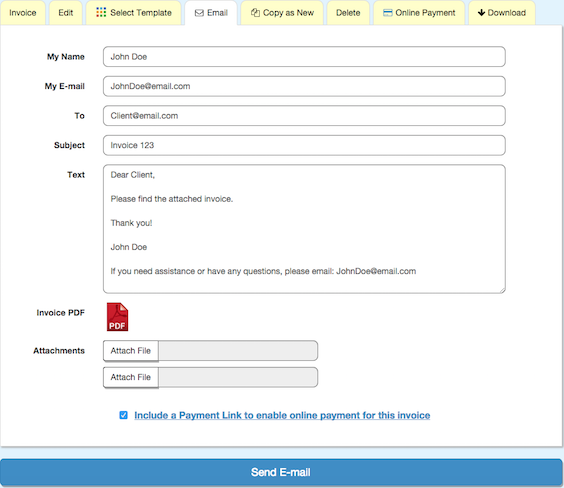
5. Click the Email tab:
6. Fill out and send an Invoice with 'Payment Link':
While the customer address should be entered, the other fields are optional.
Now just click send, and your customer can easily pay the invoice by credit card or PayPal!
Hi. I’m Designer of Blog Magic. I’m CEO/Founder of ThemeXpose. I’m Creative Art Director, Web Designer, UI/UX Designer, Interaction Designer, Industrial Designer, Web Developer, Business Enthusiast, StartUp Enthusiast, Speaker, Writer and Photographer. Inspired to make things looks better.
0 comments:
Post a Comment